Page Header
The Page Header provides the primary context for a page. It displays the page title, optional supporting information, status chips, and the primary actions for the page.
Overview
Code [coming soon]
Anatomy

- Page title
- Pin (optional)
- Status chips (optional)
- Supporting info (optional)
- Header actions
Usage Guidelines
Page Types
The Page Header appears across most product pages and adapts based on the page type.
view pages
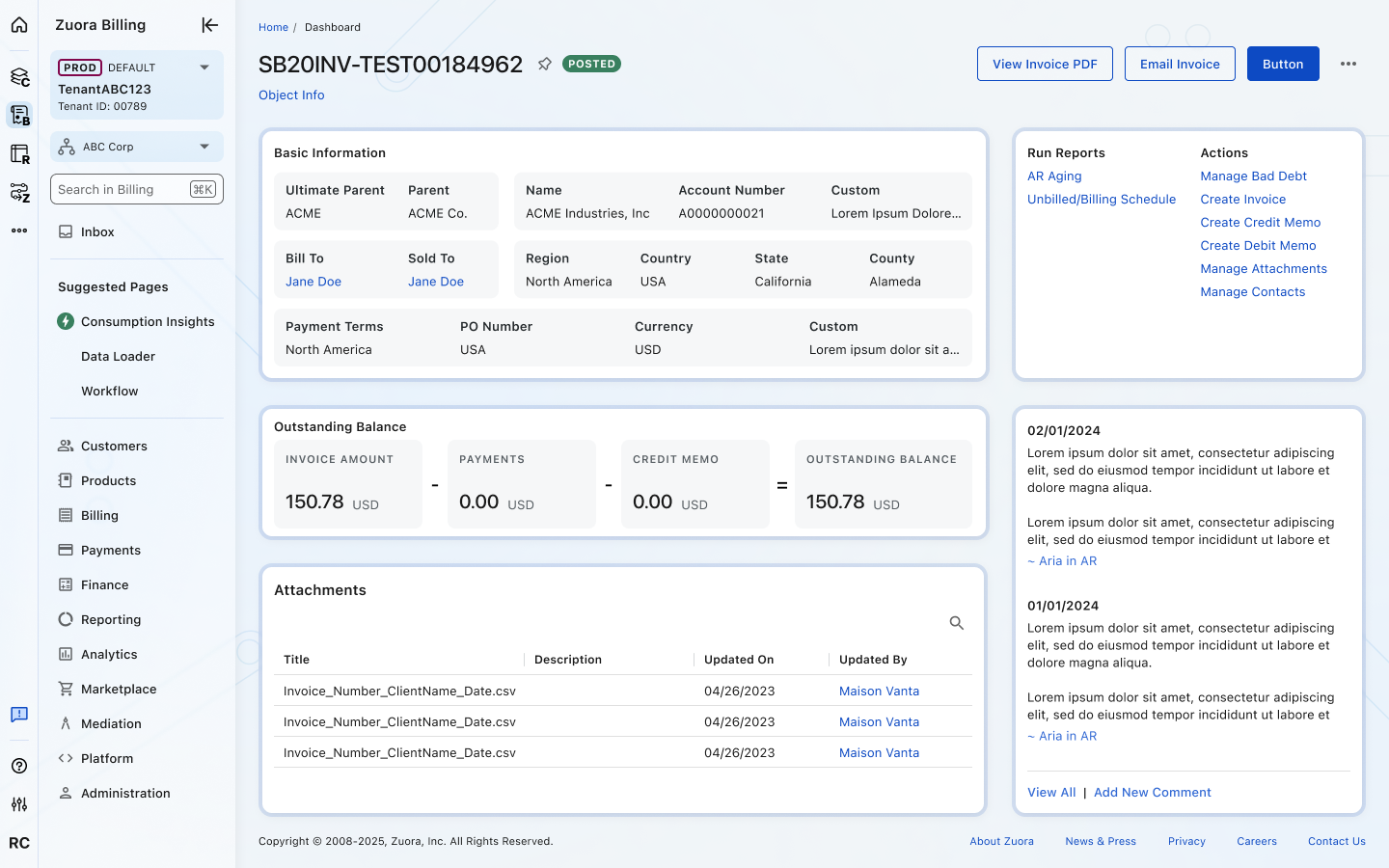
Display information such as object details, dashboards, or configurable views.
View pages focus on reviewing and interacting with existing information and have the following characteristics:
- The Page Title typically displays an object name or system-generated identifier.
- Status chips and supporting information may communicate object state or attributes.
- Header actions represent common tasks related to the object.
form pages
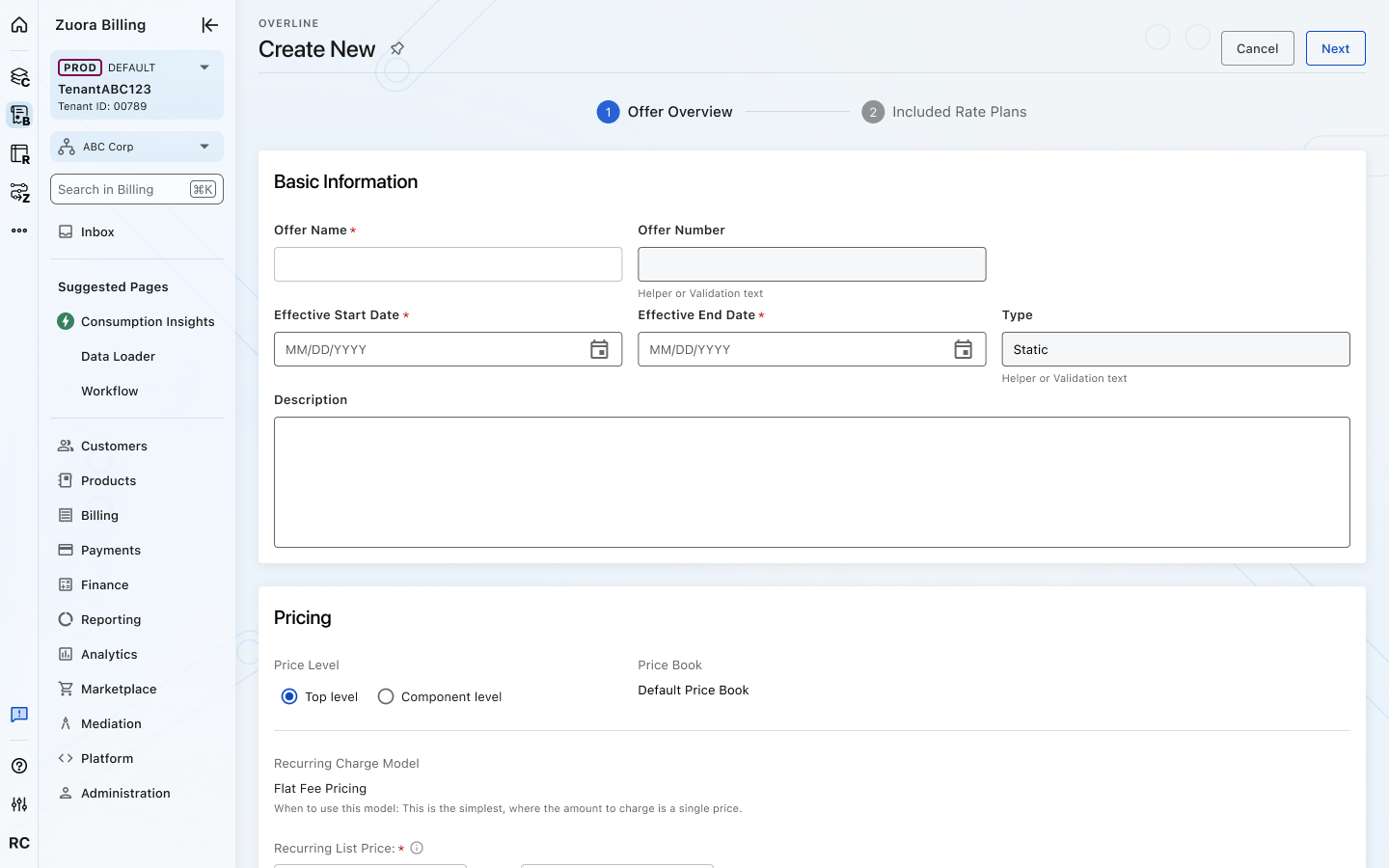
Support creating or editing records and surface workflow actions such as Create, Save, or Cancel.
Form pages focus on entering or updating information to complete a task and have the following characteristics:
- The Page Title communicates the task being performed (for example, Create or Edit).
- Header actions are workflow actions used to complete the task (Create, Save, Cancel, Next).
- Actions are designed to complete or exit the workflow, rather than interact with existing data.
Best Practices
- Keep the page title concise and descriptive so users can quickly identify the page or object.
- Use supporting information only when it adds meaningful context.
- Limit header actions to one primary action and up to two secondary actions.
- Use status chips to highlight the current state of an object.
- Avoid placing secondary or low-priority actions in the header. Move them to page content or the overflow menu when possible.
Placement
The Page Header appears below the breadcrumbs and forms the top section of the page content area.
- 24px left/right padding to align with page margins
- 24px vertical spacing between the Page Header and the main page content
This placement ensures visual consistency across pages, reinforces hierarchy, and keeps high-priority actions easily accessible.

Crafted with ❤️ at Zuora
© 2026 Zuora Inc.
Page Header
The Page Header provides the primary context for a page. It displays the page title, optional supporting information, status chips, and the primary actions for the page.
Overview
Code [coming soon]
Anatomy
- Page title
- Pin (optional)
- Status chips (optional)
- Supporting info (optional)
- Header actions
Usage Guidelines
Page Types
The Page Header appears across most product pages and adapts based on the page type.
view pages
Display information such as object details, dashboards, or configurable views.
View pages focus on reviewing and interacting with existing information and have the following characteristics:
- The Page Title typically displays an object name or system-generated identifier.
- Status chips and supporting information may communicate object state or attributes.
- Header actions represent common tasks related to the object.
form pages
Support creating or editing records and surface workflow actions such as Create, Save, or Cancel.
Form pages focus on entering or updating information to complete a task and have the following characteristics:
- The Page Title communicates the task being performed (for example, Create or Edit).
- Header actions are workflow actions used to complete the task (Create, Save, Cancel, Next).
- Actions are designed to complete or exit the workflow, rather than interact with existing data.
Best Practices
- Keep the page title concise and descriptive so users can quickly identify the page or object.
- Use supporting information only when it adds meaningful context.
- Limit header actions to one primary action and up to two secondary actions.
- Use status chips to highlight the current state of an object.
- Avoid placing secondary or low-priority actions in the header. Move them to page content or the overflow menu when possible.
Placement
The Page Header appears below the breadcrumbs and forms the top section of the page content area.
- 24px left/right padding to align with page margins
- 24px vertical spacing between the Page Header and the main page content
This placement ensures visual consistency across pages, reinforces hierarchy, and keeps high-priority actions easily accessible.
Crafted with ❤️ at Zuora
© 2026 Zuora Inc.
Page Header
The Page Header provides the primary context for a page. It displays the page title, optional supporting information, status chips, and the primary actions for the page.
Overview
Code [coming soon]
Anatomy
- Page title
- Pin (optional)
- Status chips (optional)
- Supporting info (optional)
- Header actions
Usage Guidelines
Page Types
The Page Header appears across most product pages and adapts based on the page type.
view pages
Display information such as object details, dashboards, or configurable views.
View pages focus on reviewing and interacting with existing information and have the following characteristics:
- The Page Title typically displays an object name or system-generated identifier.
- Status chips and supporting information may communicate object state or attributes.
- Header actions represent common tasks related to the object.
form pages
Support creating or editing records and surface workflow actions such as Create, Save, or Cancel.
Form pages focus on entering or updating information to complete a task and have the following characteristics:
- The Page Title communicates the task being performed (for example, Create or Edit).
- Header actions are workflow actions used to complete the task (Create, Save, Cancel, Next).
- Actions are designed to complete or exit the workflow, rather than interact with existing data.
Best Practices
- Keep the page title concise and descriptive so users can quickly identify the page or object.
- Use supporting information only when it adds meaningful context.
- Limit header actions to one primary action and up to two secondary actions.
- Use status chips to highlight the current state of an object.
- Avoid placing secondary or low-priority actions in the header. Move them to page content or the overflow menu when possible.
Placement
The Page Header appears below the breadcrumbs and forms the top section of the page content area.
- 24px left/right padding to align with page margins
- 24px vertical spacing between the Page Header and the main page content
This placement ensures visual consistency across pages, reinforces hierarchy, and keeps high-priority actions easily accessible.
Crafted with ❤️ at Zuora
© 2026 Zuora Inc.
On This Page
Page Header
The Page Header provides the primary context for a page. It displays the page title, optional supporting information, status chips, and the primary actions for the page.
Overview
Code [coming soon]
Anatomy
- Page title
- Pin (optional)
- Status chips (optional)
- Supporting info (optional)
- Header actions
Usage Guidelines
Page Types
The Page Header appears across most product pages and adapts based on the page type.
view pages
Display information such as object details, dashboards, or configurable views.
View pages focus on reviewing and interacting with existing information and have the following characteristics:
- The Page Title typically displays an object name or system-generated identifier.
- Status chips and supporting information may communicate object state or attributes.
- Header actions represent common tasks related to the object.
form pages
Support creating or editing records and surface workflow actions such as Create, Save, or Cancel.
Form pages focus on entering or updating information to complete a task and have the following characteristics:
- The Page Title communicates the task being performed (for example, Create or Edit).
- Header actions are workflow actions used to complete the task (Create, Save, Cancel, Next).
- Actions are designed to complete or exit the workflow, rather than interact with existing data.
Best Practices
- Keep the page title concise and descriptive so users can quickly identify the page or object.
- Use supporting information only when it adds meaningful context.
- Limit header actions to one primary action and up to two secondary actions.
- Use status chips to highlight the current state of an object.
- Avoid placing secondary or low-priority actions in the header. Move them to page content or the overflow menu when possible.
Placement
The Page Header appears below the breadcrumbs and forms the top section of the page content area.
- 24px left/right padding to align with page margins
- 24px vertical spacing between the Page Header and the main page content
This placement ensures visual consistency across pages, reinforces hierarchy, and keeps high-priority actions easily accessible.
Crafted with ❤️ at Zuora
© 2026 Zuora Inc.
On This Page
Page Header
The Page Header provides the primary context for a page. It displays the page title, optional supporting information, status chips, and the primary actions for the page.
Overview
Code [coming soon]
Anatomy
- Page title
- Pin )optional)
- Status chips (optional)
- Supporting info (optional)
- Header actions
Usage Guidelines
Page Types
The Page Header appears across most product pages and adapts based on the page type.
view pages
Display information such as object details, dashboards, or configurable views.
View pages focus on reviewing and interacting with existing information and have the following characteristics:
- The Page Title typically displays an object name or system-generated identifier.
- Status chips and supporting information may communicate object state or attributes.
- Header actions represent common tasks related to the object.
form pages
Support creating or editing records and surface workflow actions such as Create, Save, or Cancel.
Form pages focus on entering or updating information to complete a task and have the following characteristics:
- The Page Title communicates the task being performed (for example, Create or Edit).
- Header actions are workflow actions used to complete the task (Create, Save, Cancel, Next).
- Actions are designed to complete or exit the workflow, rather than interact with existing data.
Best Practices
- Keep the page title concise and descriptive so users can quickly identify the page or object.
- Use supporting information only when it adds meaningful context.
- Limit header actions to one primary action and up to two secondary actions.
- Use status chips to highlight the current state of an object.
- Avoid placing secondary or low-priority actions in the header. Move them to page content or the overflow menu when possible.
Placement
The Page Header appears below the breadcrumbs and forms the top section of the page content area.
- 24px left/right padding to align with page margins
- 24px vertical spacing between the Page Header and the main page content
This placement ensures visual consistency across pages, reinforces hierarchy, and keeps high-priority actions easily accessible.
Crafted with ❤️ at Zuora
© 2026 Zuora Inc.