
AI Full View
AI Full View is a dedicated AI workspace for deeper exploration, analysis, and multi-step work.
Overview
Code
AI Full View is used when AI interaction becomes the primary task, not a lightweight assist to another page. The conversation should lead the experience and support richer outputs, longer sessions, and navigation into other structured views when needed.
Anatomy
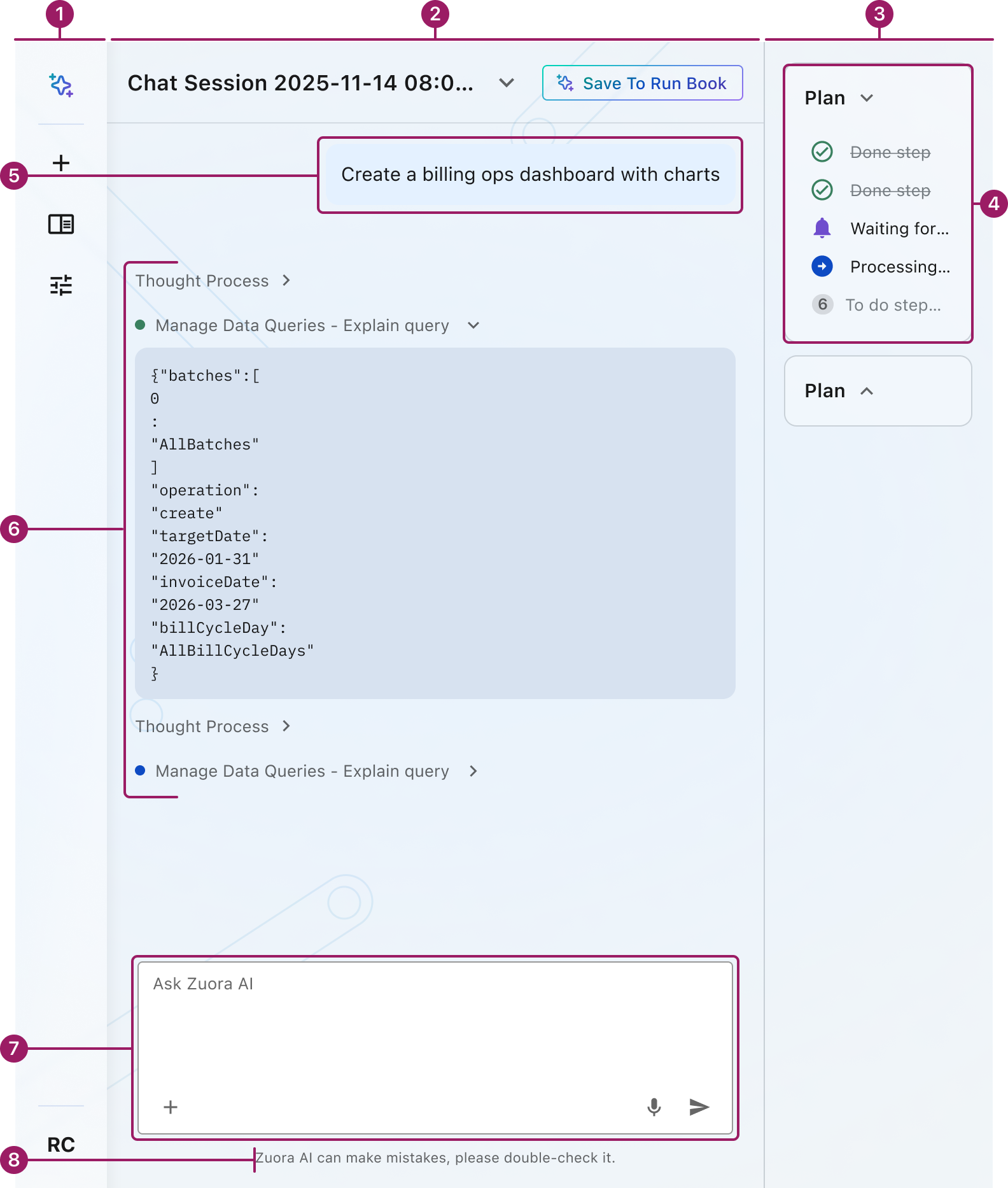
- Full View navigation
- Conversation lists
- Side panel
- Plan
- User Message
- AI Message
- Input
- AI Disclaimer
Usage Guidelines
Use When
- Users need to do deep work that will not fit well in a side panel.
- The task requires a longer, multi-step conversation instead of a quick question or summary.
- AI needs to show richer outputs such as tables, summaries, charts, or generated artifacts.
- The experience should act as a workspace that can launch users into dashboards, object views, or lists.
- Users need a dedicated page where AI interaction is the main focus.
Best Practices
- Let conversation dominate the work area and support inline rich results when they add value.
- Use full view for deeper workflows, not as a replacement for quick in-context tasks better handled in the side panel.
Crafted with ❤️ at Zuora
© 2026 Zuora Inc.
AI Full View
AI Full View is a dedicated AI workspace for deeper exploration, analysis, and multi-step work.
Overview
Code
AI Full View is used when AI interaction becomes the primary task, not a lightweight assist to another page. The conversation should lead the experience and support richer outputs, longer sessions, and navigation into other structured views when needed.
Anatomy
- Full View navigation
- Conversation lists
- Side panel
- Plan
Usage Guidelines
Use When
- Users need to do deep work that will not fit well in a side panel.
- The task requires a longer, multi-step conversation instead of a quick question or summary.
- AI needs to show richer outputs such as tables, summaries, charts, or generated artifacts.
- The experience should act as a workspace that can launch users into dashboards, object views, or lists.
- Users need a dedicated page where AI interaction is the main focus.
Best Practices
- Let conversation dominate the work area and support inline rich results when they add value.
- Use full view for deeper workflows, not as a replacement for quick in-context tasks better handled in the side panel.
Crafted with ❤️ at Zuora
© 2026 Zuora Inc.
AI Full View
AI Full View is a dedicated AI workspace for deeper exploration, analysis, and multi-step work.
Overview
Code
AI Full View is used when AI interaction becomes the primary task, not a lightweight assist to another page. The conversation should lead the experience and support richer outputs, longer sessions, and navigation into other structured views when needed.
Anatomy
- Full View navigation
- Conversation lists
- Side panel
- Plan
- User Message
- AI Message
- Input
- AI Disclaimer
Usage Guidelines
Use When
- Users need to do deep work that will not fit well in a side panel.
- The task requires a longer, multi-step conversation instead of a quick question or summary.
- AI needs to show richer outputs such as tables, summaries, charts, or generated artifacts.
- The experience should act as a workspace that can launch users into dashboards, object views, or lists.
- Users need a dedicated page where AI interaction is the main focus.
Best Practices
- Let conversation dominate the work area and support inline rich results when they add value.
- Use full view for deeper workflows, not as a replacement for quick in-context tasks better handled in the side panel.
Crafted with ❤️ at Zuora
© 2026 Zuora Inc.
On This Page
AI Full View
AI Full View is a dedicated AI workspace for deeper exploration, analysis, and multi-step work.
Overview
Code
AI Full View is used when AI interaction becomes the primary task, not a lightweight assist to another page. The conversation should lead the experience and support richer outputs, longer sessions, and navigation into other structured views when needed.
Anatomy
- Full View navigation
- Conversation lists
- Side panel
- Plan
- User Message
- AI Message
- Input
- AI Disclaimer
Usage Guidelines
Use When
- Users need to do deep work that will not fit well in a side panel.
- The task requires a longer, multi-step conversation instead of a quick question or summary.
- AI needs to show richer outputs such as tables, summaries, charts, or generated artifacts.
- The experience should act as a workspace that can launch users into dashboards, object views, or lists.
- Users need a dedicated page where AI interaction is the main focus.
Best Practices
- Let conversation dominate the work area and support inline rich results when they add value.
- Use full view for deeper workflows, not as a replacement for quick in-context tasks better handled in the side panel.
Crafted with ❤️ at Zuora
© 2026 Zuora Inc.
On This Page
AI Full View
AI Full View is a dedicated AI workspace for deeper exploration, analysis, and multi-step work.
Overview
Code
AI Full View is used when AI interaction becomes the primary task, not a lightweight assist to another page. The conversation should lead the experience and support richer outputs, longer sessions, and navigation into other structured views when needed.
Anatomy
- Full View navigation
- Conversation lists
- Side panel
- Plan
- User Message
- AI Message
- Input
- AI Disclaimer
Usage Guidelines
Use When
- Users need to do deep work that will not fit well in a side panel.
- The task requires a longer, multi-step conversation instead of a quick question or summary.
- AI needs to show richer outputs such as tables, summaries, charts, or generated artifacts.
- The experience should act as a workspace that can launch users into dashboards, object views, or lists.
- Users need a dedicated page where AI interaction is the main focus.
Best Practices
- Let conversation dominate the work area and support inline rich results when they add value.
- Use full view for deeper workflows, not as a replacement for quick in-context tasks better handled in the side panel.
Crafted with ❤️ at Zuora
© 2026 Zuora Inc.