
AI Summary
AI Summary presents an AI-generated narrative summary of page or object context. It helps users scan key takeaways quickly, then take follow-up actions or open a deeper conversation.
Overview
Code
Anatomy
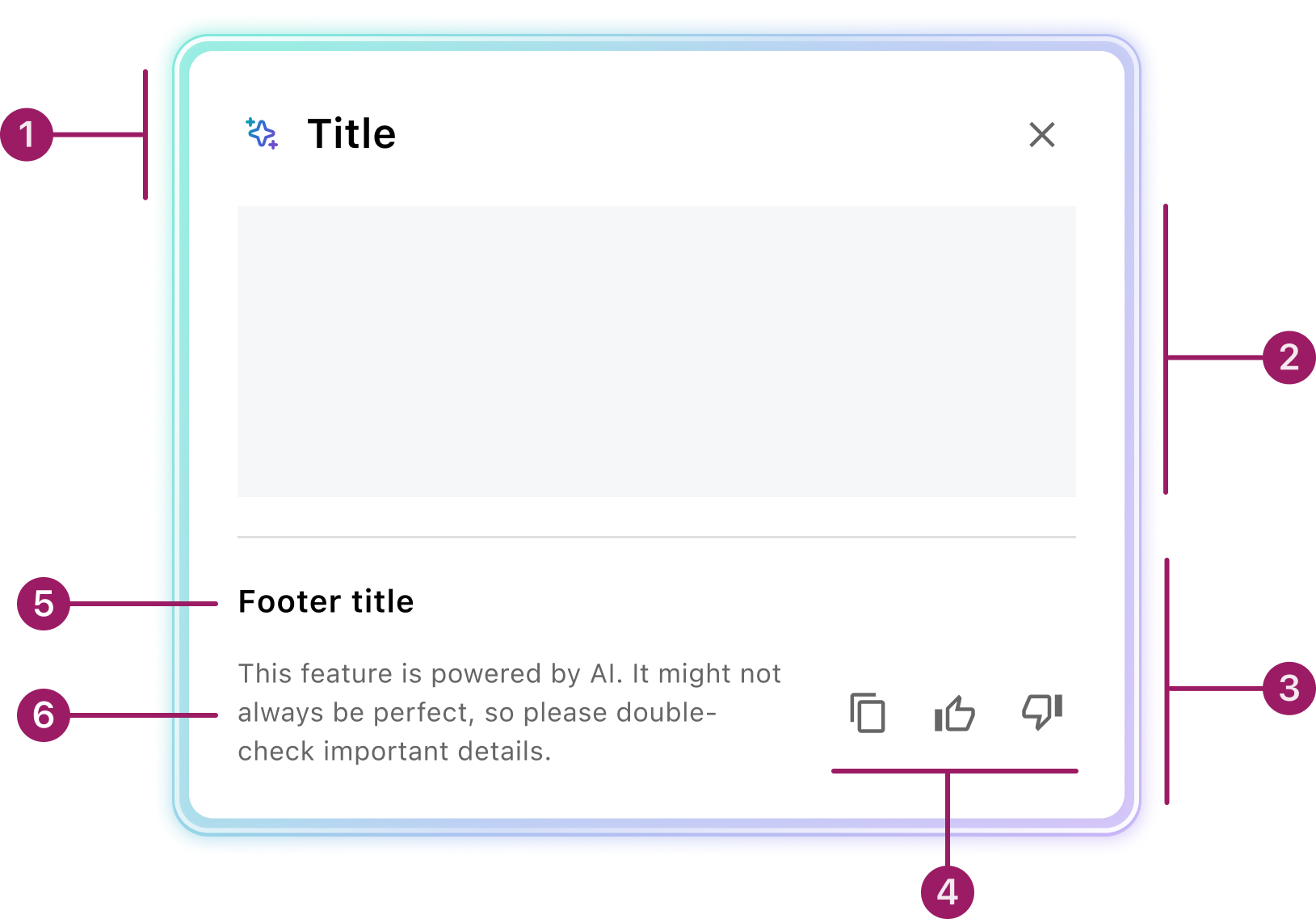
- Header
- Content area
- Footer
- Feedback actions
- Footer title
- Disclaimer
Usage Guidelines
Use When
- Summarizing dense or complex content where an AI overview saves significant scanning time.
- Users need suggested next actions or follow-up prompts tied to the summary.
- Providing a quick context snapshot before users dig into detail.
Best Practices
- Always include clear AI disclosure: use the sparkle icon and disclaimer to signal AI-generated content.
- Provide a link or button back to the full context—summaries should complement, not replace, detailed information.
- Choose the right variant: use Inline for page-embedded summaries and Popover for lightweight overlays from controls.
- Validate summaries with real data before shipping; test edge cases like very short or very long content.
Types
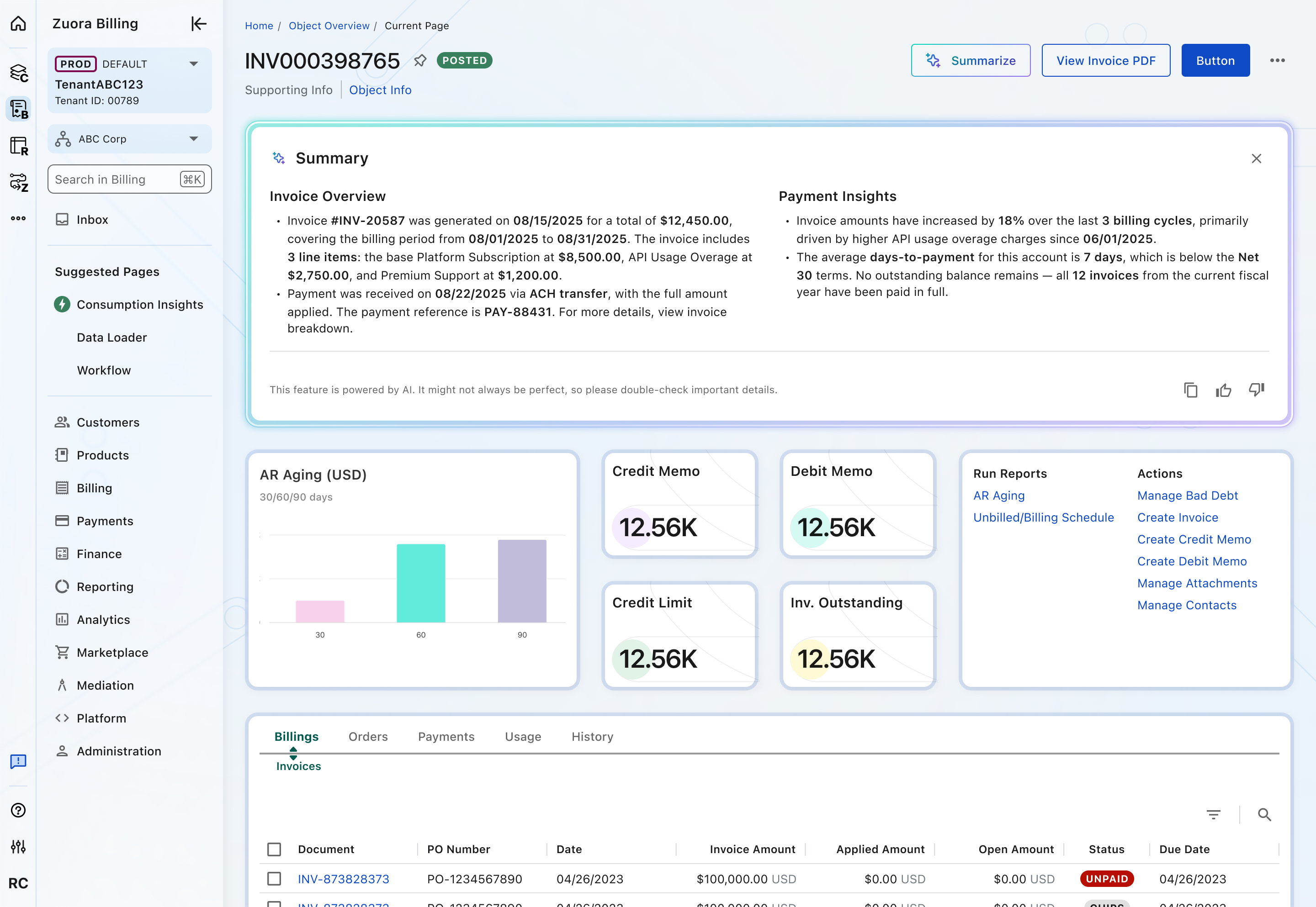
Inline
Displays the AI Summary directly within the page content. Use when the summary is important to the user’s workflow and should remain visible alongside related information.
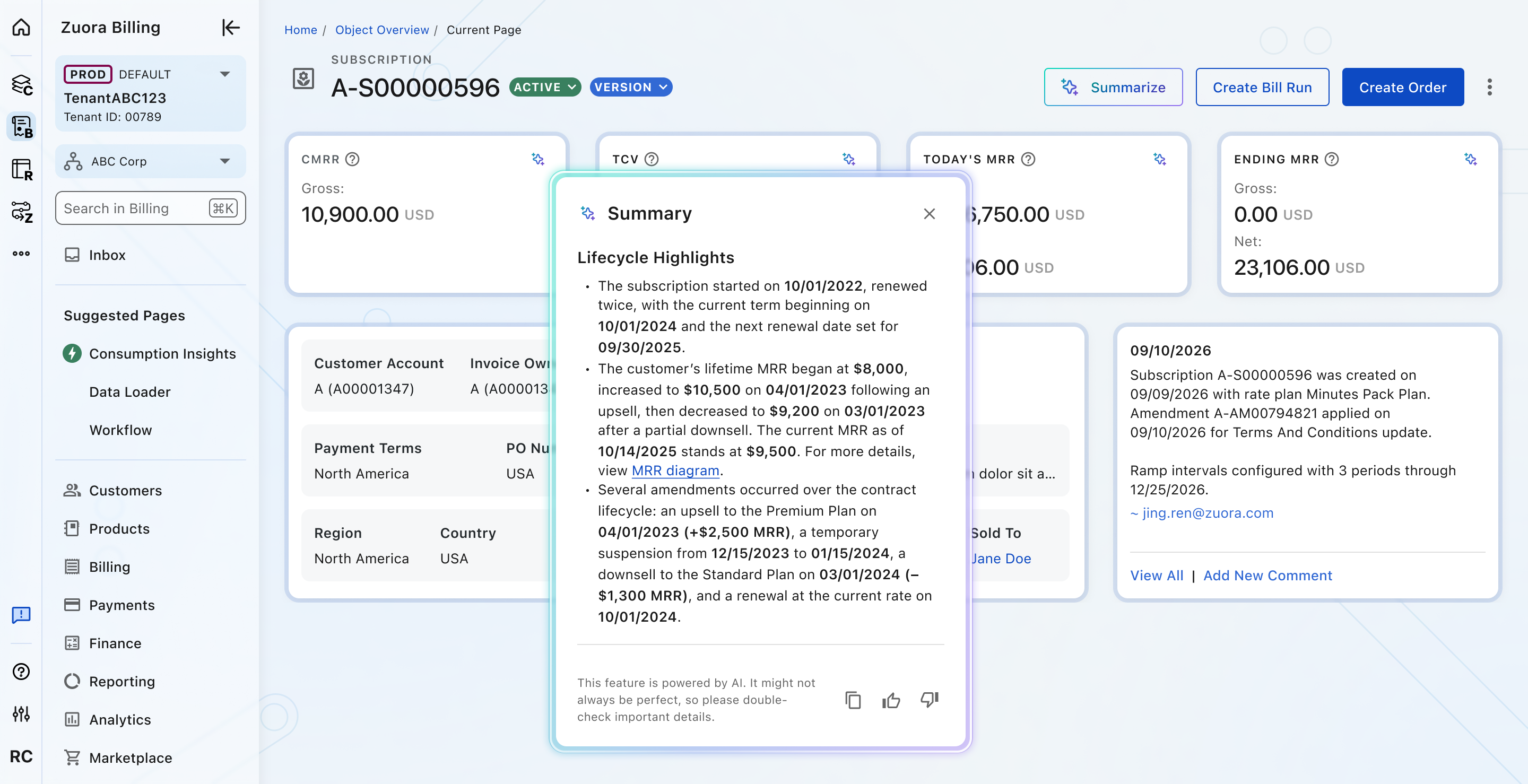
Popover
Displays the AI Summary in a temporary overlay triggered by a user action. Use when the summary provides supplemental information without taking up permanent space on the page.
Crafted with ❤️ at Zuora
© 2026 Zuora Inc.
AI Summary
AI Summary presents an AI-generated narrative summary of page or object context. It helps users scan key takeaways quickly, then take follow-up actions or open a deeper conversation.
Overview
Code
Anatomy
- Header
- Content area
- Footer
- Feedback actions
- Footer title
- Disclaimer
Usage Guidelines
Use When
- Summarizing dense or complex content where an AI overview saves significant scanning time.
- Users need suggested next actions or follow-up prompts tied to the summary.
- Providing a quick context snapshot before users dig into detail.
Best Practices
- Always include clear AI disclosure: use the sparkle icon and disclaimer to signal AI-generated content.
- Provide a link or button back to the full context—summaries should complement, not replace, detailed information.
- Choose the right variant: use Inline for page-embedded summaries and Popover for lightweight overlays from controls.
- Validate summaries with real data before shipping; test edge cases like very short or very long content.
Types
Inline
Displays the AI Summary directly within the page content. Use when the summary is important to the user’s workflow and should remain visible alongside related information.
Popover
Displays the AI Summary in a temporary overlay triggered by a user action. Use when the summary provides supplemental information without taking up permanent space on the page.
Crafted with ❤️ at Zuora
© 2026 Zuora Inc.
AI Summary
AI Summary presents an AI-generated narrative summary of page or object context. It helps users scan key takeaways quickly, then take follow-up actions or open a deeper conversation.
Overview
Code
Anatomy
- Header
- Content area
- Footer
- Feedback actions
- Footer title
- Disclaimer
Usage Guidelines
Use When
- Summarizing dense or complex content where an AI overview saves significant scanning time.
- Users need suggested next actions or follow-up prompts tied to the summary.
- Providing a quick context snapshot before users dig into detail.
Best Practices
- Always include clear AI disclosure: use the sparkle icon and disclaimer to signal AI-generated content.
- Provide a link or button back to the full context—summaries should complement, not replace, detailed information.
- Choose the right variant: use Inline for page-embedded summaries and Popover for lightweight overlays from controls.
- Validate summaries with real data before shipping; test edge cases like very short or very long content.
Types
Inline
Displays the AI Summary directly within the page content. Use when the summary is important to the user’s workflow and should remain visible alongside related information.
Popover
Displays the AI Summary in a temporary overlay triggered by a user action. Use when the summary provides supplemental information without taking up permanent space on the page.
Crafted with ❤️ at Zuora
© 2026 Zuora Inc.
On This Page
AI Summary
AI Summary presents an AI-generated narrative summary of page or object context. It helps users scan key takeaways quickly, then take follow-up actions or open a deeper conversation.
Overview
Code
Anatomy
- Header
- Content area
- Footer
- Feedback actions
- Footer title
- Disclaimer
Usage Guidelines
Use When
- Summarizing dense or complex content where an AI overview saves significant scanning time.
- Users need suggested next actions or follow-up prompts tied to the summary.
- Providing a quick context snapshot before users dig into detail.
Best Practices
- Always include clear AI disclosure: use the sparkle icon and disclaimer to signal AI-generated content.
- Provide a link or button back to the full context—summaries should complement, not replace, detailed information.
- Choose the right variant: use Inline for page-embedded summaries and Popover for lightweight overlays from controls.
- Validate summaries with real data before shipping; test edge cases like very short or very long content.
Types
Inline
Displays the AI Summary directly within the page content. Use when the summary is important to the user’s workflow and should remain visible alongside related information.
Popover
Displays the AI Summary in a temporary overlay triggered by a user action. Use when the summary provides supplemental information without taking up permanent space on the page.
Crafted with ❤️ at Zuora
© 2026 Zuora Inc.
On This Page
AI Summary
AI Summary presents an AI-generated narrative summary of page or object context. It helps users scan key takeaways quickly, then take follow-up actions or open a deeper conversation.
Overview
Code
Anatomy
- Header
- Content area
- Footer
- Feedback actions
- Footer title
- Disclaimer
Usage Guidelines
Use When
- Summarizing dense or complex content where an AI overview saves significant scanning time.
- Users need suggested next actions or follow-up prompts tied to the summary.
- Providing a quick context snapshot before users dig into detail.
Best Practices
- Always include clear AI disclosure: use the sparkle icon and disclaimer to signal AI-generated content.
- Provide a link or button back to the full context—summaries should complement, not replace, detailed information.
- Choose the right variant: use Inline for page-embedded summaries and Popover for lightweight overlays from controls.
- Validate summaries with real data before shipping; test edge cases like very short or very long content.
Types
Inline
Displays the AI Summary directly within the page content. Use when the summary is important to the user’s workflow and should remain visible alongside related information.
Popover
Displays the AI Summary in a temporary overlay triggered by a user action. Use when the summary provides supplemental information without taking up permanent space on the page.
Crafted with ❤️ at Zuora
© 2026 Zuora Inc.