
AI Card
AI Card is a versatile container used to present AI-generated content in a structured way. It can display information, visualizations, images, actions, and input controls, while maintaining a consistent AI-branded style through the border and icon.
Overview
Code
Anatomy
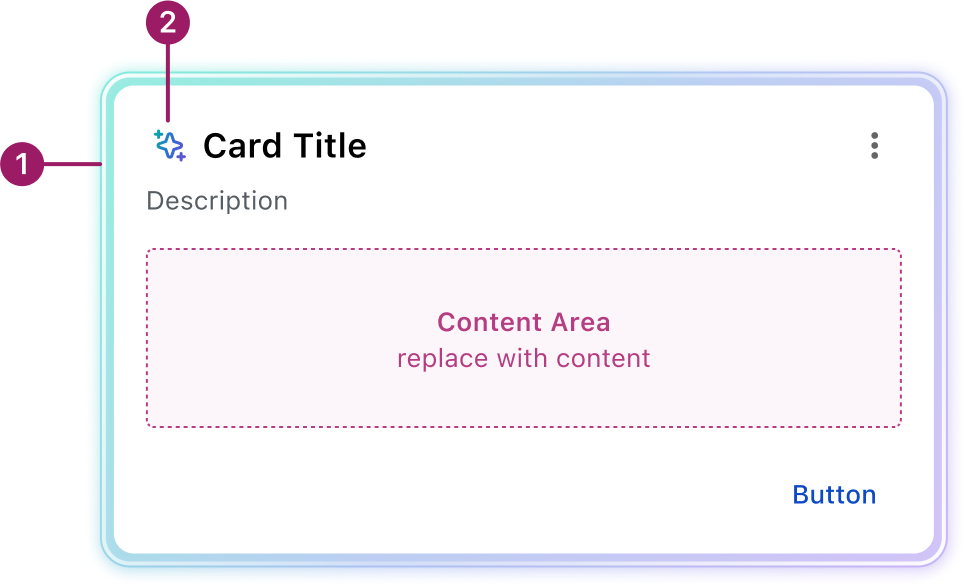
- AI border
- AI Spark
The AI Card component inherits its functionality and guidelines from the core Occam Card.
Usage Guidelines
Use When
Displaying AI-generated or contextual content in a modular, scannable format.
Best Practices
- Show one AI card at a time to keep focus and reduce cognitive load.
- If multiple AI outputs are needed, group them in a single card with clear separation to maintain context.
- Keep the design simple and aligned with the overall interface; avoid unnecessary AI-themed decoration.
Crafted with ❤️ at Zuora
© 2026 Zuora Inc.
AI Card
AI Card is a versatile container used to present AI-generated content in a structured way. It can display information, visualizations, images, actions, and input controls, while maintaining a consistent AI-branded style through the border and icon.
Overview
Code
Anatomy
- AI border
- AI Spark
The AI Card component inherits its functionality and guidelines from the core Occam Card.
Usage Guidelines
Use When
Displaying AI-generated or contextual content in a modular, scannable format.
Best Practices
- Show one AI card at a time to keep focus and reduce cognitive load.
- If multiple AI outputs are needed, group them in a single card with clear separation to maintain context.
- Keep the design simple and aligned with the overall interface; avoid unnecessary AI-themed decoration.
Crafted with ❤️ at Zuora
© 2026 Zuora Inc.
AI Card
AI Card is a versatile container used to present AI-generated content in a structured way. It can display information, visualizations, images, actions, and input controls, while maintaining a consistent AI-branded style through the border and icon.
Overview
Code
Anatomy
- AI border
- AI Spark
The AI Card component inherits its functionality and guidelines from the core Occam Card.
Usage Guidelines
Use When
Displaying AI-generated or contextual content in a modular, scannable format.
Best Practices
- Show one AI card at a time to keep focus and reduce cognitive load.
- If multiple AI outputs are needed, group them in a single card with clear separation to maintain context.
- Keep the design simple and aligned with the overall interface; avoid unnecessary AI-themed decoration.
Crafted with ❤️ at Zuora
© 2026 Zuora Inc.
On This Page
AI Card
AI Card is a versatile container used to present AI-generated content in a structured way. It can display information, visualizations, images, actions, and input controls, while maintaining a consistent AI-branded style through the border and icon.
Overview
Code
Anatomy
- AI border
- AI Spark
The AI Card component inherits its functionality and guidelines from the core Occam Card.
Usage Guidelines
Use When
Displaying AI-generated or contextual content in a modular, scannable format.
Best Practices
- Show one AI card at a time to keep focus and reduce cognitive load.
- If multiple AI outputs are needed, group them in a single card with clear separation to maintain context.
- Keep the design simple and aligned with the overall interface; avoid unnecessary AI-themed decoration.
Crafted with ❤️ at Zuora
© 2026 Zuora Inc.
On This Page
AI Card
AI Card is a versatile container used to present AI-generated content in a structured way. It can display information, visualizations, images, actions, and input controls, while maintaining a consistent AI-branded style through the border and icon.
Overview
Code
Anatomy
- AI border
- AI Spark
The AI Card component inherits its functionality and guidelines from the core Occam Card.
Usage Guidelines
Use When
Displaying AI-generated or contextual content in a modular, scannable format.
Best Practices
- Show one AI card at a time to keep focus and reduce cognitive load.
- If multiple AI outputs are needed, group them in a single card with clear separation to maintain context.
- Keep the design simple and aligned with the overall interface; avoid unnecessary AI-themed decoration.
Crafted with ❤️ at Zuora
© 2026 Zuora Inc.