
AI Chip
AI Chip displays AI-generated outputs such as tags, summaries, or quick actions, providing contextual insights in a lightweight format.
Overview
Code
Anatomy
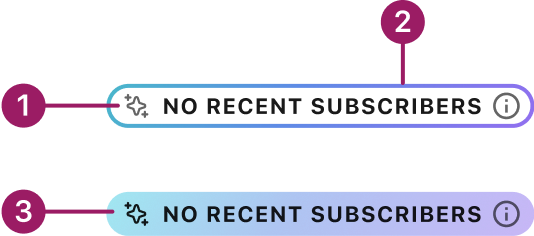
- AI icon
- AI border
- AI gradient
The AI Chip component inherits its functionality and guidelines from the core Occam Chip.
Usage Guidelines
Use When
- Highlighting concise insights or summaries generated by AI.
- Displaying short classifications, tags, or statuses tied to AI outputs.
- Representing lightweight AI-powered actions, such as dismissing or refining an insight.
- Providing inline feedback that complements larger AI components (e.g., AI Card).
Best Practices
Use chips for AI-generated insights, not for manual or static labels.
Crafted with ❤️ at Zuora
© 2026 Zuora Inc.
AI Chip
AI Chip displays AI-generated outputs such as tags, summaries, or quick actions, providing contextual insights in a lightweight format.
Overview
Code
Anatomy
- AI icon
- AI border
- AI gradient
The AI Chip component inherits its functionality and guidelines from the core Occam Chip.
Usage Guidelines
Use When
- Highlighting concise insights or summaries generated by AI.
- Displaying short classifications, tags, or statuses tied to AI outputs.
- Representing lightweight AI-powered actions, such as dismissing or refining an insight.
- Providing inline feedback that complements larger AI components (e.g., AI Card).
Best Practices
Use chips for AI-generated insights, not for manual or static labels.
Crafted with ❤️ at Zuora
© 2026 Zuora Inc.
AI Chip
AI Chip displays AI-generated outputs such as tags, summaries, or quick actions, providing contextual insights in a lightweight format.
Overview
Code
Anatomy
- AI icon
- AI border
- AI gradient
The AI Chip component inherits its functionality and guidelines from the core Occam Chip.
Usage Guidelines
Use When
- Highlighting concise insights or summaries generated by AI.
- Displaying short classifications, tags, or statuses tied to AI outputs.
- Representing lightweight AI-powered actions, such as dismissing or refining an insight.
- Providing inline feedback that complements larger AI components (e.g., AI Card).
Best Practices
Use chips for AI-generated insights, not for manual or static labels.
Crafted with ❤️ at Zuora
© 2026 Zuora Inc.
On This Page
AI Chip
AI Chip displays AI-generated outputs such as tags, summaries, or quick actions, providing contextual insights in a lightweight format.
Overview
Code
Anatomy
- AI icon
- AI border
- AI gradient
The AI Chip component inherits its functionality and guidelines from the core Occam Chip.
Usage Guidelines
Use When
- Highlighting concise insights or summaries generated by AI.
- Displaying short classifications, tags, or statuses tied to AI outputs.
- Representing lightweight AI-powered actions, such as dismissing or refining an insight.
- Providing inline feedback that complements larger AI components (e.g., AI Card).
Best Practices
Use chips for AI-generated insights, not for manual or static labels.
Crafted with ❤️ at Zuora
© 2026 Zuora Inc.
On This Page
AI Chip
AI Chip displays AI-generated outputs such as tags, summaries, or quick actions, providing contextual insights in a lightweight format.
Overview
Code
Anatomy
- AI icon
- AI border
- AI gradient
The AI Chip component inherits its functionality and guidelines from the core Occam Chip.
Usage Guidelines
Use When
- Highlighting concise insights or summaries generated by AI.
- Displaying short classifications, tags, or statuses tied to AI outputs.
- Representing lightweight AI-powered actions, such as dismissing or refining an insight.
- Providing inline feedback that complements larger AI components (e.g., AI Card).
Best Practices
Use chips for AI-generated insights, not for manual or static labels.
Crafted with ❤️ at Zuora
© 2026 Zuora Inc.