
AI Icon Button
An icon button serves as a trigger for activating and launching the AI-powered features.
Overview
Code
Anatomy
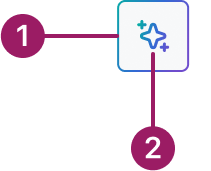
- AI border
- AI Spark
The AI Icon Button component inherits its functionality and guidelines from the core Occam Icon Button.
Usage Guidelines
Use When
- Launching or activating a Zuora AI-powered feature.
- Providing a quick, lightweight trigger for AI actions.
- Placing AI access inline with content where a full button would be visually heavy.
- Offering secondary entry points to AI features alongside primary actions.
Best Practices
- Use icon buttons only for launching AI-powered features.
- Pair with a tooltip or label to clarify the AI action and improve accessibility.
- Use sparingly — icon buttons should not replace primary AI action buttons.
- Ensure icons are recognizable and clearly associated with the AI action.
Variants
Contained

minimal

Crafted with ❤️ at Zuora
© 2026 Zuora Inc.
AI Icon Button
An icon button serves as a trigger for activating and launching the AI-powered features.
Overview
Code
Anatomy
- AI border
- AI Spark
The AI Icon Button component inherits its functionality and guidelines from the core Occam Icon Button.
Usage Guidelines
Use When
- Launching or activating a Zuora AI-powered feature.
- Providing a quick, lightweight trigger for AI actions.
- Placing AI access inline with content where a full button would be visually heavy.
- Offering secondary entry points to AI features alongside primary actions.
Best Practices
- Use icon buttons only for launching AI-powered features.
- Pair with a tooltip or label to clarify the AI action and improve accessibility.
- Use sparingly — icon buttons should not replace primary AI action buttons.
- Ensure icons are recognizable and clearly associated with the AI action.
Variants
Contained
minimal
Crafted with ❤️ at Zuora
© 2026 Zuora Inc.
AI Icon Button
An icon button serves as a trigger for activating and launching the AI-powered features.
Overview
Code
Anatomy
- AI border
- AI Spark
The AI Icon Button component inherits its functionality and guidelines from the core Occam Icon Button.
Usage Guidelines
Use When
- Launching or activating a Zuora AI-powered feature.
- Providing a quick, lightweight trigger for AI actions.
- Placing AI access inline with content where a full button would be visually heavy.
- Offering secondary entry points to AI features alongside primary actions.
Best Practices
- Use icon buttons only for launching AI-powered features.
- Pair with a tooltip or label to clarify the AI action and improve accessibility.
- Use sparingly — icon buttons should not replace primary AI action buttons.
- Ensure icons are recognizable and clearly associated with the AI action.
Variants
Contained
minimal
Crafted with ❤️ at Zuora
© 2026 Zuora Inc.
On This Page
AI Icon Button
An icon button serves as a trigger for activating and launching the AI-powered features.
Overview
Code
Anatomy
- AI border
- AI Spark
The AI Icon Button component inherits its functionality and guidelines from the core Occam Icon Button.
Usage Guidelines
Use When
- Launching or activating a Zuora AI-powered feature.
- Providing a quick, lightweight trigger for AI actions.
- Placing AI access inline with content where a full button would be visually heavy.
- Offering secondary entry points to AI features alongside primary actions.
Best Practices
- Use icon buttons only for launching AI-powered features.
- Pair with a tooltip or label to clarify the AI action and improve accessibility.
- Use sparingly — icon buttons should not replace primary AI action buttons.
- Ensure icons are recognizable and clearly associated with the AI action.
Variants
Contained
minimal
Crafted with ❤️ at Zuora
© 2026 Zuora Inc.
On This Page
AI Icon Button
An icon button serves as a trigger for activating and launching the AI-powered features.
Overview
Code
Anatomy
- AI border
- AI Spark
The AI Icon Button component inherits its functionality and guidelines from the core Occam Icon Button.
Usage Guidelines
Use When
- Launching or activating a Zuora AI-powered feature.
- Providing a quick, lightweight trigger for AI actions.
- Placing AI access inline with content where a full button would be visually heavy.
- Offering secondary entry points to AI features alongside primary actions.
Best Practices
- Use icon buttons only for launching AI-powered features.
- Pair with a tooltip or label to clarify the AI action and improve accessibility.
- Use sparingly — icon buttons should not replace primary AI action buttons.
- Ensure icons are recognizable and clearly associated with the AI action.
Variants
Contained
minimal
Crafted with ❤️ at Zuora
© 2026 Zuora Inc.